Here’s How Contractors Can Get Better Time Tracking Without Changing Accounting Systems
If you’re a construction company using QuickBooks Online, you’re not alone.
Thousands of contractors rely on QuickBooks Online every day to manage their accounting. It’s a trusted platform, and for many businesses, it’s the center of their back-office operations.
But when it comes to tracking time in the field, things can get a little more complicated.
Many contractors find themselves asking:
- What’s the best time tracking app for a construction company using QuickBooks?
- Is there a better option than QuickBooks Time?
- Can I improve job costing without changing my accounting & payroll systems?
- How do I keep field and office data connected?
The good news is that you don’t have to choose between better time tracking and keeping QuickBooks Online.
The Challenge: Accounting and Field Operations Have Different Needs
QuickBooks Online is designed to help businesses with their accounting & payroll management.
Construction companies, however, have additional challenges that go beyond accounting:
- Tracking labor by project
- Managing cost codes
- Understanding job costs
- Capturing accurate field time
- Scheduling paid time off
- Managing crews across multiple job sites
While accounting teams need accurate hours, project managers and field supervisors need visibility into what’s happening on the job.
That’s why many contractors start searching for a construction time tracking app for QuickBooks Online that can handle both field operations and accounting workflows.
Why a QuickBooks Online Construction Accounting Integration Matters
Accounting and payroll data are only valuable if it’s accurate.
When employee hours, overtime, projects, and cost codes are managed in separate systems, office teams often spend time transferring information manually and verifying data before processing.
A strong QuickBooks Online integration helps reduce manual entry, improve accuracy, and keep workforce information connected between the field and the office.
Instead of forcing teams to choose between back office convenience and operational visibility, the right integration allows each system to do what it does best.
 Why Contractors Choose BusyBusy
BusyBusy was built specifically for contractors.
Instead of trying to make accounting software handle field operations, BusyBusy focuses on helping construction companies:
- Track employee time from the field
- Manage projects and cost codes
- Improve job costing visibility
- Confirm GPS locations
- Understand labor costs in real time
- Gain better workforce visibility
The goal isn’t to replace QuickBooks Online.
It’s to make it even more powerful.
Keep QuickBooks Online for Accounting
One of the biggest concerns contractors have when evaluating new software is:
“Do I need to change my current accounting process?”
The answer is no.
With BusyBusy’s QuickBooks Online Integration, you can continue using QuickBooks Online for your accounting and payroll needs while using BusyBusy for time tracking and workforce management.
That means:
- Your office team can continue working in QuickBooks Online.
- Your field teams can track time in BusyBusy.
- Information stays connected between both systems.
For many contractors, that’s the best of both worlds.
Automated Field Time Cards for QuickBooks Online
Many contractors still spend valuable time collecting, reviewing, and entering employee hours into their accounting software.
BusyBusy helps replace manual processes with automated field time cards for QuickBooks Online.
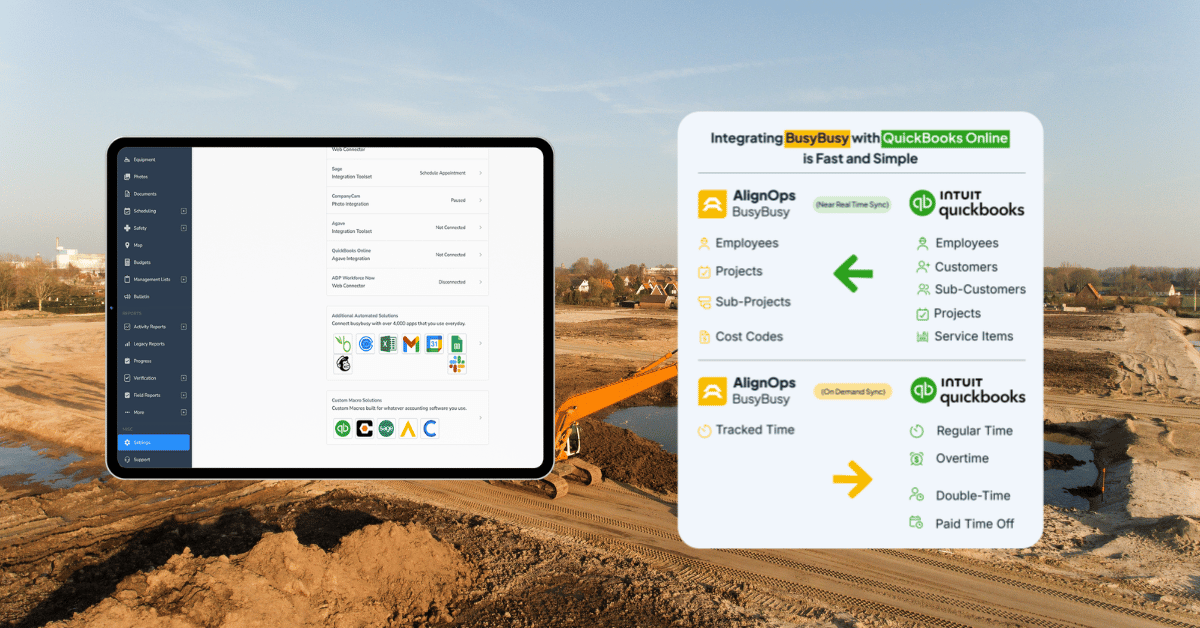
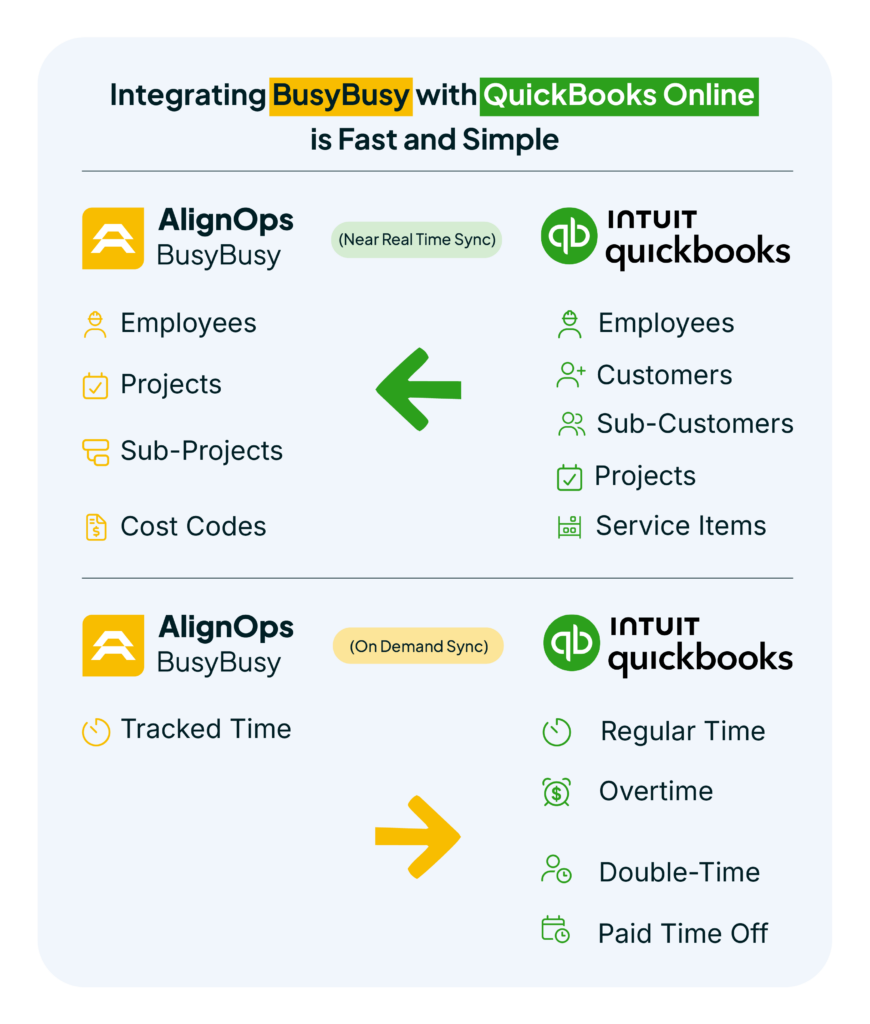
Employees track their time directly in BusyBusy, while approved regular time, overtime, double-time, and PTO can be sent into QuickBooks Online with the click of a button.This reduces duplicate entry, improves accounting accuracy, and gives office teams greater confidence in their time tracking data.
How Does BusyBusy Integrate with QuickBooks Online?
The BusyBusy QuickBooks Online Integration helps keep important information aligned between systems.
QuickBooks Online → BusyBusy
Employee, project, sub-project, customer, and service item information automatically sync from QuickBooks Online into BusyBusy.
This helps ensure field teams are always working with the latest information.
BusyBusy → QuickBooks Online
Approved employee time can be sent from BusyBusy back into QuickBooks Online using BusyBusy’s Sync Now button.
This gives contractors control over when labor data is transferred while keeping administrative work to a minimum.
Is BusyBusy the Best Job Costing Time Tracker for QBO?
Many contractors searching for the best job costing time tracker for QBO are looking for more than a simple time clock.
They need visibility into:
- Labor by project
- Labor by cost code
- Workforce productivity
- Project schedules
- Job performance
BusyBusy helps contractors connect labor data to projects and cost codes, providing greater insight into where labor hours are being spent and helping improve job costing accuracy.
Combined with QuickBooks Online, BusyBusy delivers a powerful solution for both field operations and accounting management.
BusyBusy vs QuickBooks Time
One of the most common questions contractors ask is how BusyBusy compares to QuickBooks Time.
Both BusyBusy and QuickBooks Time integrate with QuickBooks Online and provide GPS-enabled time tracking. The difference is that BusyBusy was built specifically for construction.
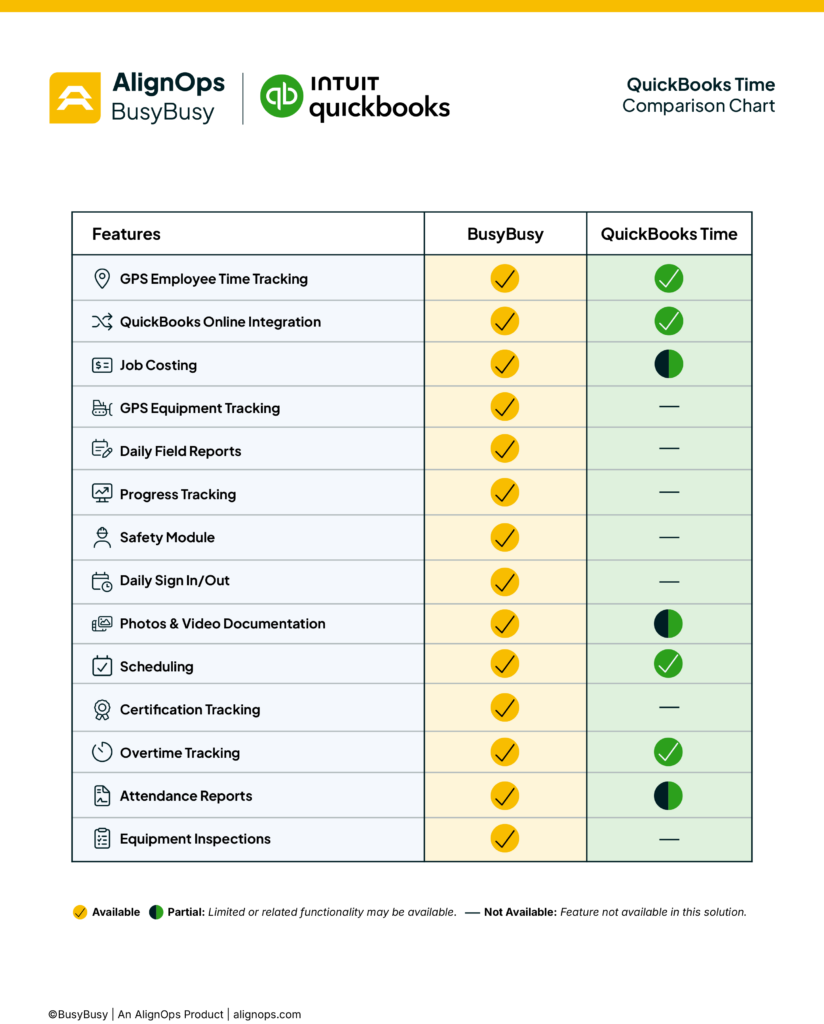 In addition to time tracking, BusyBusy includes:
- Advanced labor job costing
- Equipment tracking
- Daily reports
- Progress tracking
- Safety management tools
- Construction-specific reporting
- Field Documentation, Photos, and Videos
- Top Rated Customer Support
For contractors who need more than just time tracking, BusyBusy helps connect the office and field while providing greater visibility into labor costs, equipment usage, safety compliance, and project performance.
Frequently Asked Questions
Who should I use for time tracking with QuickBooks Online?
Many contractors choose BusyBusy because it provides construction-focused time tracking, workforce management, PTO tracking, and job costing visibility while integrating directly with QuickBooks Online.
What is the best time tracking app for a construction company using QuickBooks?
BusyBusy is a strong option for contractors who want field-focused time tracking while continuing to use QuickBooks Online for accounting and payroll.
Can I keep QuickBooks Online for accounting and use BusyBusy for time tracking?
Yes. That’s exactly how many BusyBusy customers use the integration.
QuickBooks Online remains the accounting system while BusyBusy handles field time tracking, GPS, project documentation, workforce management, and much more..
What is the best job costing time tracker for QBO?
For contractors who need labor visibility by project and cost code, BusyBusy combines time tracking, workforce management, and job costing tools while integrating directly with QuickBooks Online.
How does BusyBusy compare to QuickBooks Time?
BusyBusy provides construction-focused time tracking and workforce management tools, while also helping contractors gain greater visibility into labor costs, projects, and job performance.
Can BusyBusy sync with QuickBooks Online?
Yes. BusyBusy integrates directly with QuickBooks Online.
Employee, project, sub-project, and cost code information syncs from QuickBooks Online into BusyBusy, while approved time and PTO can be sent back into QuickBooks Online.
The Bottom Line
Construction companies shouldn’t have to choose between accounting convenience and field visibility.
By connecting BusyBusy and QuickBooks Online, contractors can keep the accounting system they already trust while gaining better tools for time tracking, workforce management, and job costing.
If you’re currently using QuickBooks Online and looking for a better way to manage labor in the field, BusyBusy may be the solution you’re looking for.
Learn more about the BusyBusy QuickBooks Online Integration or schedule a demo to see how it works.