Construction Work Orders
BusyBusy Work Orders gives your team one place to assign, track, and document equipment repairs, maintenance, and project tasks. Everyone can see what needs doing, who’s on it, and when it’s done—without relying on phone calls, sticky notes, or someone remembering to follow up.
Don’t let the next repair fall through the cracks
When a job lives in a text thread, nobody knows who owns it, what it cost, or whether it ever got done. The machine sits waiting on a repair nobody remembers assigning, and the office is left chasing answers.
With BusyBusy Work Orders, every job has an owner, a status, and a record, from the moment it’s assigned to the moment it’s signed off.
Simple work orders, built for the field and office
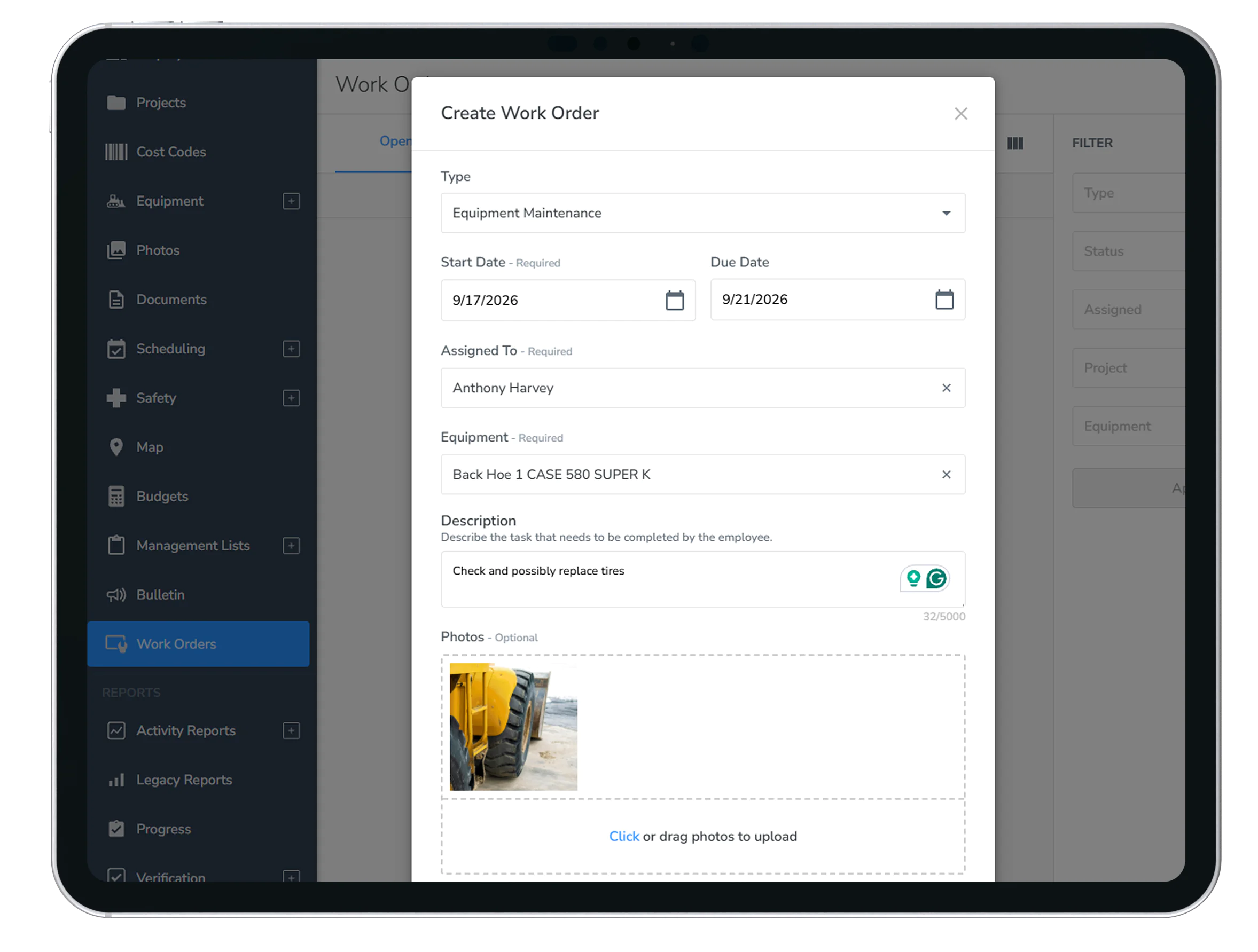
Three Job Types, One List: Equipment Maintenance, Equipment Repair, and Project Task, all tracked in one place.
Clear Ownership: Assign every job to the person doing the work. They get notified when it’s assigned, and you get notified when it’s done.
Due Dates and Status: Set a due date if you need one, and see what’s Not Started, In Progress, or Complete at a glance.
Inspection to Repair: When an equipment inspection turns up a problem, create the work order right from the inspection, with the equipment already filled in. (Requires Equipment Inspections.)
Tied to Equipment and Projects: Every job is tied to the machine or project it belongs to. From a machine’s page, jump straight to all of its work orders.
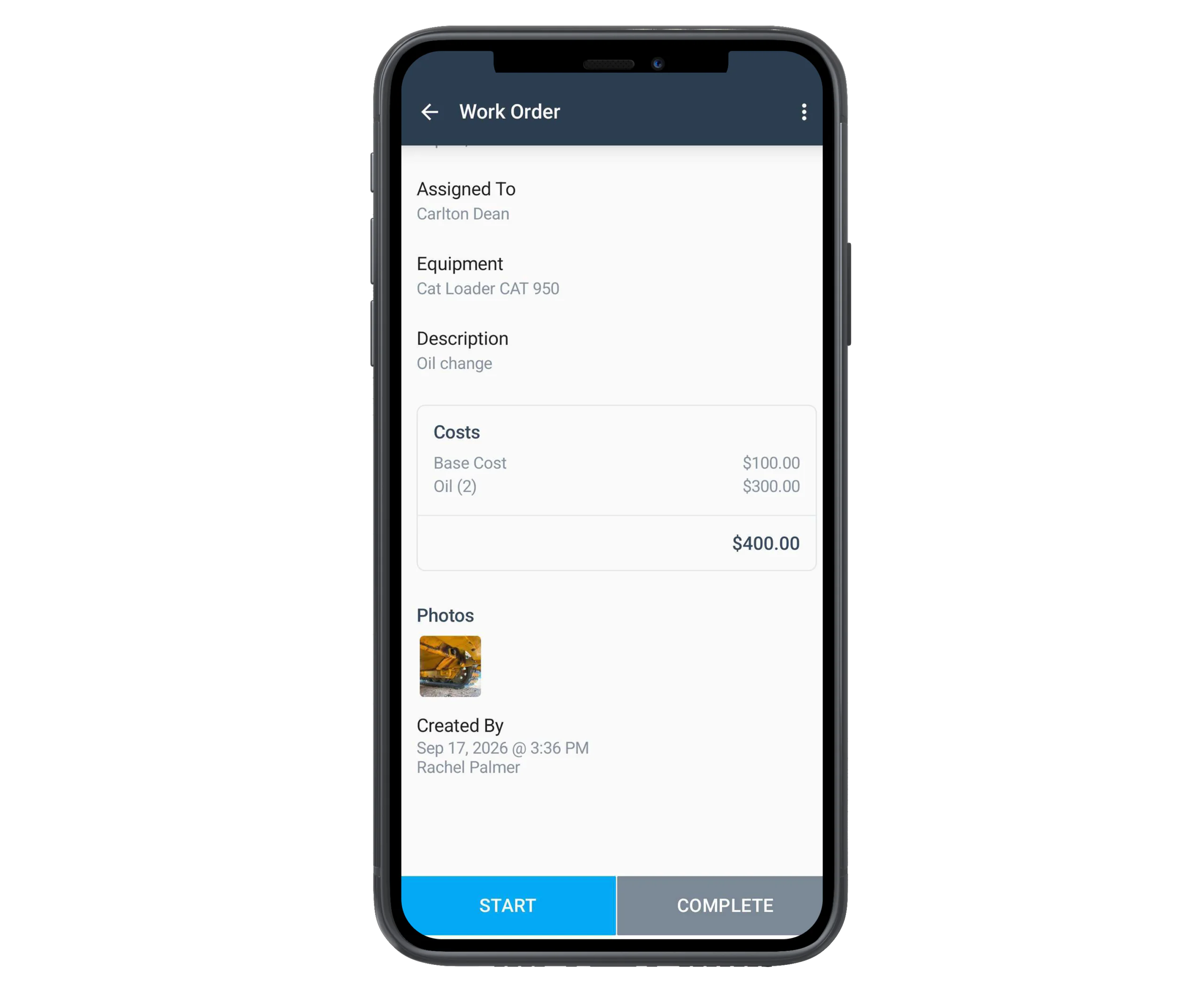
Itemized Costs: A base cost plus line items for parts, fluids, fees, or labor, each with a quantity and unit cost, totaled for you.
Photos and Sign-Off: Add photos when the job is created and when it’s finished. Turn on signatures and your crew signs off at completion, with an optional second sign-off from a supervisor or customer, who sees a summary of the job and its cost before signing.
Work Order Numbers, Your Way: Use BusyBusy’s automatic, sequential ID, your own work order number, or both, so your records match what the office already uses.
Mobile Access in the Field: Crews see their assigned jobs right on the clock-in screen and can start and finish them from their phone, on iOS or Android. On mobile, you can find any job by either work order number.
Print and Export: Print one work order or a whole stack to a single PDF, or export to a spreadsheet, from the web.
Why work orders matter
-Less Gets Lost: Replace calls, texts, paper, and memory with one place where every job gets written down, assigned, and tracked.
-Less Chasing: Clear owners, clear statuses, and notifications when a job is assigned or finished mean fewer “did that ever get done?” calls.
-Know What Jobs Cost: Itemized costs on every job. Filter by a piece of equipment and a date range, then export, to see what that machine has cost you.
-Proof When You Need It: Photos, completion notes, signatures, and printable records give you something to show a customer, an inspector, or your own office.
The result: every job has an owner, a status, and a record, and your team spends less time chasing work and more time getting it done.
Part of the BusyBusy Operations Module
Work Orders is part of BusyBusy Operations, alongside:
Explore other Operations Module features:
Certifications & Licenses
Track worker certifications and credentials to ensure crews are qualified and ready to work.
→ View Certifications & Licenses
Equipment Inspections
Replace paper inspections with mobile checklists tied to each piece of equipment.
Customer Reviews

Michael R.
Safety Manager
“BusyBusy’s Inspections feature has transformed how we manage safety on our jobsite. The customizable checklists and automated reminders ensure we never miss an inspection.”
“BusyBusy’s Inspections feature has transformed how we manage safety on our jobsite. The customizable checklists and automated reminders ensure we never miss an inspection.”
Ron
Own Industries, Inc.
“Using this innovative software has improved our ability to manage inspections and training… It’s also worth noting that the service and support we receive has always and continues to be nothing less than 5-Stars!!”
“Using this innovative software has improved our ability to manage inspections and training… It’s also worth noting that the service and support we receive has always and continues to be nothing less than 5-Stars!!”
Why choose BusyBusy?
Work Orders lives right alongside the projects, equipment, and employees you already manage in BusyBusy, so there’s no separate system to set up or keep straight.
From time tracking to job costing to equipment inspections, BusyBusy gives construction teams the tools to run the whole operation from the office or the field.