Construction Equipment Maintenance
BusyBusy Equipment Maintenance keeps your machines serviced on schedule. Set it up by days, hours, or miles, and your crew logs hour meter and mileage readings right when they clock out. BusyBusy tells you what’s coming due before it turns into a breakdown, and once the service is done, the schedule starts over.
Don’t find out a machine needed service after it breaks down
When maintenance lives in a notebook, a whiteboard, or one guy’s memory, things get missed. The oil change gets pushed a week, then another. Then the machine goes down mid-job, the crew stands around, and you’re paying for a rental you didn’t plan on.
With BusyBusy Equipment Maintenance, every machine has a schedule, a status, and a service history, so you’re fixing problems on your timeline, not the machine’s.
Simple preventive maintenance, built for the field and office
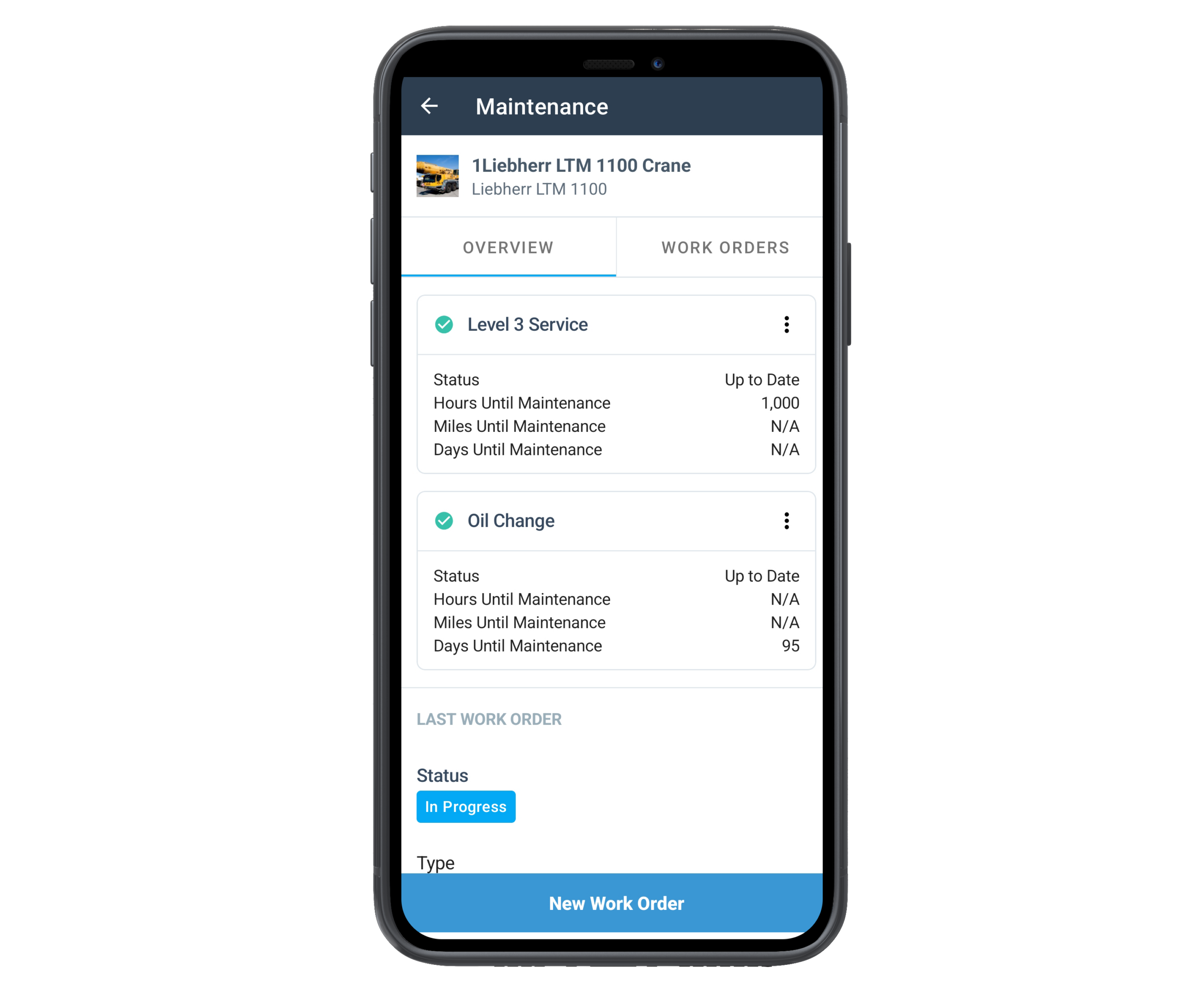
Schedule by Days, Hours, or Miles: Set service intervals the way your equipment actually needs them. Every 60 days, every 250 hours, every 5,000 miles.
Readings Logged at Clock-Out: When an employee clocks out of a piece of equipment, BusyBusy prompts them for the hour meter and mileage. No separate logbook, no chasing down numbers at the end of the week.
Whichever Comes First: Track days and hours (or miles) on the same schedule. BusyBusy keeps an eye on both and flags whichever one hits first.
More Than One Schedule Per Machine: Oil changes, tune-ups, fluid changes. Give each its own schedule on the same piece of equipment.
A Heads-Up When You Want It: Pick how far ahead a schedule flips to Due Soon. Ten days out, 25 hours out, whatever gives your shop enough time to plan.
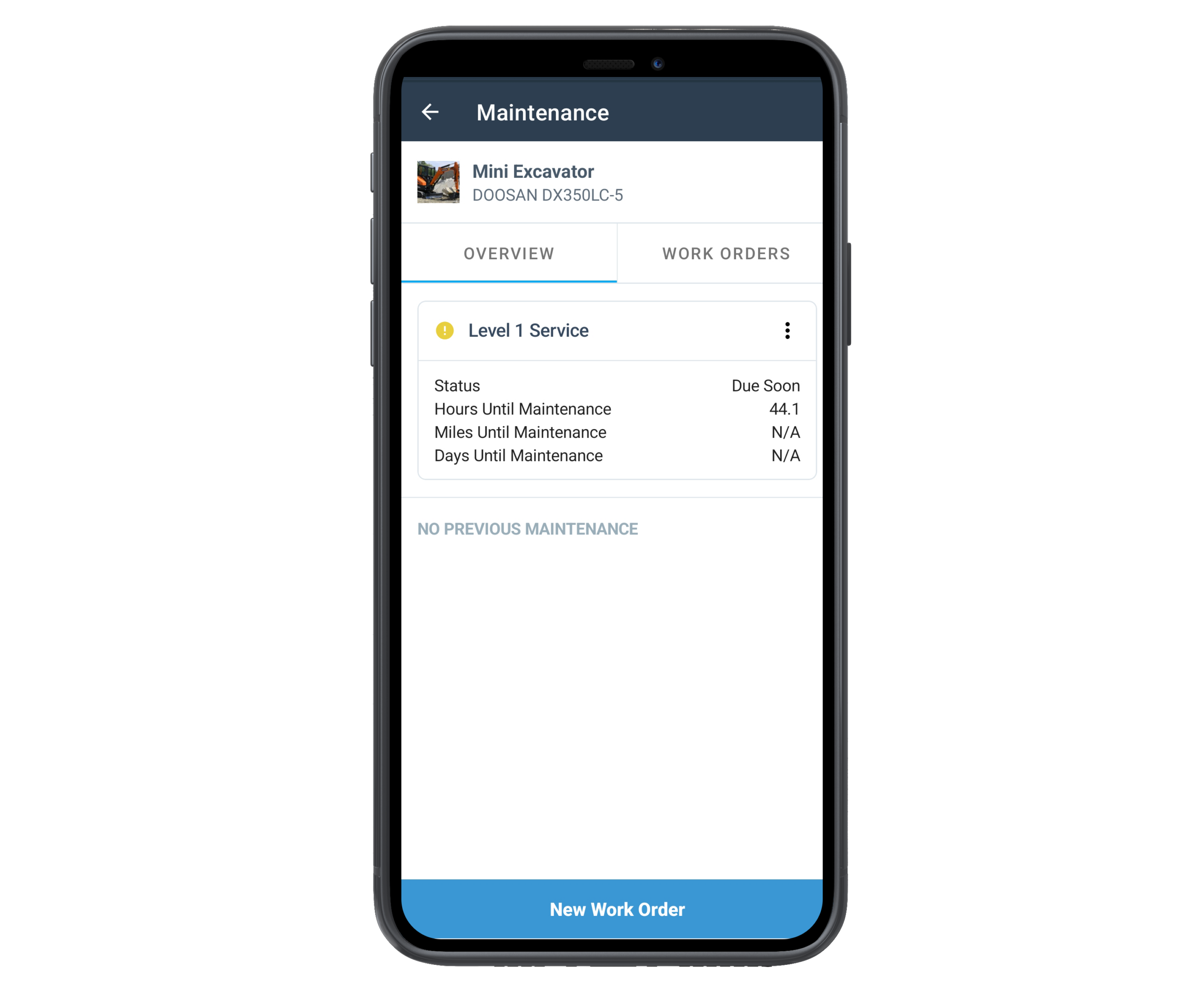
Up to Date, Due Soon, or Overdue: Every schedule shows where it stands at a glance, so nobody has to dig through paperwork to find out.
One List of What Needs Attention: The Maintenance report splits your fleet into what needs attention now and everything else, so the office knows exactly where to start.
From Due to Done: Using Work Orders too? When service comes due, create the work order right from that schedule, with the equipment already filled in.
The Schedule Resets Itself: When the maintenance work order is marked complete, the countdown starts over from the day the work was done. No manual updates.
Reset Maintenance Yourself: When the service is done, in your shop or somewhere else, reset the schedule and the countdown starts over.
Every Machine’s Service History: Open any piece of equipment to see its last service, any open work orders, every schedule, and its full history of completed maintenance and repairs.
Why equipment maintenance tracking matters
Less Downtime: Catch service before it becomes a breakdown, so machines stay on the job and crews stay working.
Less Guessing: No more “when did we last change the oil on that thing?” The answer is right there.
Know What a Machine Really Costs: Pair it with Work Orders and every maintenance and repair job carries its costs. Add it up and you’ll know what it takes to keep a machine running, and when it’s time to replace it.
Proof When You Need It: A complete service history backs you up when you sell a machine, file a warranty claim, or answer an inspector.
The result: your equipment gets serviced on schedule, your crews lose fewer days to breakdowns, and you’ve got the records to prove it.
How it works
Set the schedule. On any piece of equipment, turn on maintenance tracking and add a schedule by days, hours, or miles.
Crews log readings at clock-out. When an employee clocks out of a piece of equipment, they’re prompted for the hour meter and mileage.
BusyBusy keeps watch. Each schedule shows how long until service is due and flags it when it’s getting close.
Get it done. Create and assign a work order right from the schedule, or reset the schedule yourself once the service is done.
It starts over. Mark the work order complete and the schedule resets for next time, automatically.
Coming soon: automatic hour meter and mileage readings
If your equipment has GPS or telematics trackers, hour meter and mileage readings will flow into BusyBusy automatically. No manual entry. See GPS Equipment Tracking
Part of the BusyBusy Equipment Module
Equipment Inspections is part of the BusyBusy Equipment Module, a set of tools designed to help construction teams plan work, stay compliant, and keep jobs moving efficiently.
Explore other Equipment Module features:
Certifications & Licenses
Track worker certifications and credentials to ensure crews are qualified and ready to work.
→ View Certifications & Licenses
Resource Planning
Plan projects, crews, and equipment on a visual timeline—then adjust quickly when things change.
Work Orders
Assign, track, and document repairs, maintenance, and project tasks in one place.
Equipment Inspections
Replace paper inspections with mobile checklists tied to each piece of equipment.
Frequently Asked Questions
Can I schedule maintenance by hours and days at the same time?
Yes. A schedule can track days, hours, and miles together, and BusyBusy flags whichever one comes up first.
Do I need Work Orders to use Equipment Maintenance?
No. Equipment Maintenance works on its own, and you can reset a schedule yourself when service is done. Add Work Orders and it gets better: create the work order right from the schedule, track what the job cost, and the schedule resets itself when the work is marked complete.
What if the service was done outside BusyBusy?
You can reset the schedule yourself, no work order needed.
Can one machine have more than one maintenance schedule?
Yes. Set up as many as you need, like an oil change every 250 hours and a general tune-up every 60 days.
Where do the hour meter and mileage readings come from?
Your crew. When an employee clocks out of a piece of equipment, BusyBusy prompts them to enter the hour meter and mileage. Automatic readings from GPS and telematics trackers are coming soon.
What's the difference between preventive maintenance and an equipment inspection?
An inspection is a check before or after use to catch problems. Preventive maintenance is scheduled service, like oil changes and tune-ups, done on a set interval whether or not anything looks wrong. BusyBusy handles both, and an inspection issue can become a work order in one step.
Customer reviews

Michael R.
Safety Manager
“BusyBusy’s Inspections feature has transformed how we manage safety on our jobsite. The customizable checklists and automated reminders ensure we never miss an inspection.”
“BusyBusy’s Inspections feature has transformed how we manage safety on our jobsite. The customizable checklists and automated reminders ensure we never miss an inspection.”
Ron
Own Industries, Inc.
“Using this innovative software has improved our ability to manage inspections and training… It’s also worth noting that the service and support we receive has always and continues to be nothing less than 5-Stars!!”
“Using this innovative software has improved our ability to manage inspections and training… It’s also worth noting that the service and support we receive has always and continues to be nothing less than 5-Stars!!”
Why choose BusyBusy?
Beyond enhancing jobsite safety with our Observations feature, BusyBusy offers a comprehensive suite of tools designed to make your jobsite more efficient and productive. From time tracking to job costing, discover all the ways BusyBusy can benefit your team.
Ensure your jobsite is safe, compliant, and efficient with BusyBusy’s Inspections feature. Join the thousands of satisfied customers who trust BusyBusy for their jobsite management needs.